GST GSTIN
How to check GSTIN validity
Check a GSTIN in two steps: first make sure its 15-character format is right, then look it up on the GST portal's Search Taxpayer page to see the legal name, status and filing record.
- Accountants creating party masters
- Purchase teams onboarding suppliers
- Distributors billing B2B dealers
- Owners checking new buyers
- Billing staff entering GSTINs

On this page 12
Why it matters
- Selling: a wrong buyer GSTIN in GSTR-1 sends their credit to someone else, or nowhere. You will have to amend it.
- Buying: ITC is available only from a registered supplier whose invoice appears in your GSTR-2B. A cancelled or fake GSTIN means no credit, and possibly a notice.
- Composition suppliers: they cannot charge GST. If one does, you cannot claim that tax.
Step 1: check the format
| Characters | Meaning | Example: 08ABCDE1234F1Z5 |
|---|---|---|
| 1–2 | State code | 08 = Rajasthan |
| 3–12 | PAN of the business | ABCDE1234F |
| 13 | Entity number for the same PAN in the state | 1 |
| 14 | Default character | Z |
| 15 | Check character | 5 |
The example above is made up for illustration. Quick format checks: 15 characters; state code matches the address; characters 3–12 follow PAN's pattern (five letters, four digits, one letter); 14th character is usually Z. The last character is a checksum, so a single typing error usually fails validation on the portal. More in how to read a GSTIN and the GST state codes list.
Step 2: search on the GST portal
- Go to gst.gov.in. Without logging in, open Search Taxpayer, then Search by GSTIN/UIN.
- Enter the GSTIN and the captcha.
- Read the result: legal name, trade name, effective date of registration, constitution of business, taxpayer type, status and principal place of business.
- Open the return filing details to see whether GSTR-1 and GSTR-3B have been filed recently.
You can also search by PAN to see all GSTINs a business holds in different states, which helps when a customer gives you the wrong branch's GSTIN.
Reading the result
| What you see | What to do |
|---|---|
| Active, regular taxpayer, returns filed | Proceed |
| Active, composition taxpayer | Expect a bill of supply with no GST; no ITC |
| Suspended | Hold ITC-dependent purchases; ask the supplier |
| Cancelled | Do not accept tax invoices dated after cancellation; treat the party as unregistered |
| Name does not match the invoice | Ask for clarification before booking |
| Long gaps in return filing | Your ITC from this supplier is at risk |
What to ask a new supplier or buyer
Before the first transaction, ask for:
- A copy of the GST registration certificate, showing legal name, GSTIN and address.
- The GSTIN of the specific branch or state that will bill or receive the goods.
- Whether they are a regular or composition taxpayer.
- For suppliers, a sample invoice, so you can see that the name, GSTIN and HSN appear correctly.
Then compare each item with the Search Taxpayer result. If the certificate says one address and the portal shows another, ask. A trader in Surat, for example, may hold registrations in Gujarat and Maharashtra under the same PAN; the GSTIN on your invoice must be the one for the state the goods are billed from or to.
When to check
- When creating a new party master, every time.
- Before a large first order from a new supplier.
- Periodically for regular suppliers, say quarterly, to catch cancellations.
- When a supplier's invoices stop appearing in your GSTR-2B.
Common mistakes
- Copying a GSTIN from an old visiting card after the business moved or re-registered.
- Using the head office GSTIN for a branch in another state.
- Typing O for 0 or I for 1.
- Creating two party masters for the same buyer with different GSTINs, so ledgers split.
This is general information, not tax advice.
Keeping GSTINs right in Tally and Cashflow OS
The GSTIN lives in the party ledger in TallyPrime. Cashflow OS syncs party ledgers, so you can check a party's GSTIN and state from the phone, and if writing back is switched on, staff can create or alter a party ledger with its GSTIN from the app; Tally validates the entry. The portal lookup itself is done on gst.gov.in.
Avoid these
Common mistakes
- MistakeCopying a GSTIN from an old visiting card or letterheadDo this instead
Ask for the registration certificate and confirm the GSTIN on Search Taxpayer before the first bill.
- MistakeUsing the head office GSTIN for a branch in another stateDo this instead
Search by PAN to see all GSTINs of the business, and use the one for the state the goods are billed from or to.
- MistakeChecking a supplier once and never againDo this instead
Recheck regular suppliers every quarter, and at once when their invoices stop appearing in your GSTR-2B; registrations do get cancelled.
- MistakeBooking GST charged by a composition supplier as ITCDo this instead
A composition dealer cannot charge GST, so no credit is available on such a bill. Ask the supplier to correct it and book the cost accordingly.
Keep handy
Checklist
How to check GSTIN validity — 8 checks. Tick them as you go.
In Cashflow OS
How Cashflow OS helps
Cashflow OS puts your TallyPrime books on every phone in the team. Where it fits this topic:
See a party's GSTIN and state on the phone
Party ledgers sync from TallyPrime, so you can check the GSTIN and state stored for any customer or supplier before taking an order or making a payment.
See Tally on mobile
Fix the party master from the app
With writing back switched on, authorised staff can create or alter a party ledger with its GSTIN from the phone or web; Tally validates the entry. The portal lookup is still done on gst.gov.in.
See Create Tally vouchers from your phone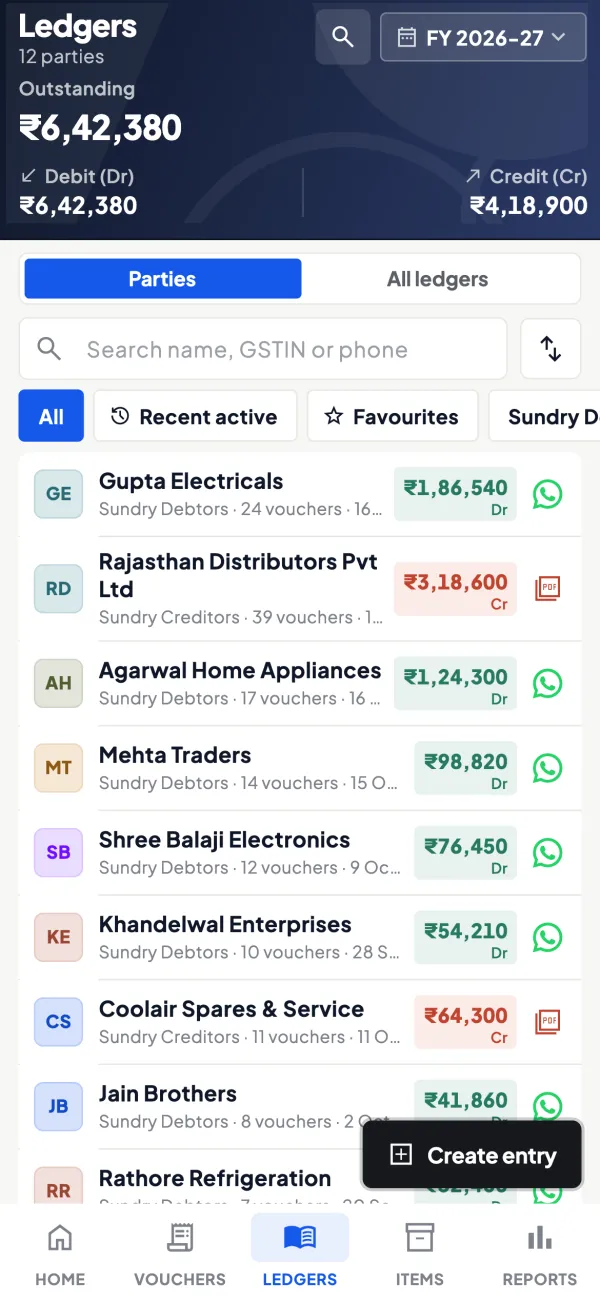
Questions people ask
Can I check a GSTIN without logging in?
Can I claim ITC from a supplier whose GSTIN is cancelled?
How do I find all GSTINs of a business?
What if a buyer will not give a GSTIN?
Does a valid GSTIN guarantee my ITC?
What does Z in a GSTIN mean?
How often should I recheck a regular supplier's GSTIN?
How do I know if a GSTIN is fake?
This page is general information for Indian businesses, not tax, legal or financial advice. Rules and rates change — check the official portals or your CA before acting.