GST GST basics
Nil-rated, exempt and non-GST supplies
All four kinds carry no GST on the bill, but they are not the same. Nil-rated and exempt supplies cost you input tax credit, zero-rated exports do not, and non-GST goods sit outside the GST law altogether.
- Grocery and kirana wholesalers
- Traders selling taxable and exempt items
- Exporters
- Accountants preparing returns
- Buyers of fuel or exempt services
On this page 11
Four categories side by side
| Type | What it means | Example | ITC on related inputs |
|---|---|---|---|
| Nil-rated | Goods or services listed with a 0% rate in the rate schedule | Items shown at 0% in the rate notification | Not available |
| Exempt | Taxable in principle, but freed from tax by an exemption notification | Certain healthcare and education services | Not available |
| Zero-rated | Exports and supplies to SEZ units or developers | Goods shipped abroad under LUT | Available; refund possible |
| Non-GST | Outside the GST levy for now | Petroleum crude, petrol, diesel, ATF, natural gas; alcoholic liquor for human consumption | Not available |
For ITC purposes, the law's definition of 'exempt supply' covers nil-rated, wholly exempt and non-taxable supplies together. Rates and exemptions change by notification, and many were revised in the September 2025 rate rationalisation, so check the current status of any item on cbic-gst.gov.in.
Why the difference matters: input tax credit
A business making both taxable and exempt supplies cannot claim ITC on inputs used for the exempt side. Where inputs or services are common to both, the credit is split by turnover under Rules 42 and 43 of the CGST Rules.
Example. A grocery wholesaler's month: taxable sales ₹30,00,000, nil-rated sales ₹10,00,000. Common ITC on rent, electricity and packing material is ₹40,000.
- Share of exempt turnover = ₹10,00,000 ÷ ₹40,00,000 = 25%
- ITC to reverse = ₹40,000 × 25% = ₹10,000
- ITC kept = ₹30,000
ITC on goods bought purely for the nil-rated sales is not claimed at all. The monthly figure is trued-up after the year closes. See input tax credit conditions for the wider rules.
What document to issue
- Only exempt or nil-rated items: a bill of supply, not a tax invoice. See bill of supply under GST.
- Taxable and exempt items to an unregistered buyer on one bill: a single invoice-cum-bill of supply is allowed.
- Exports under LUT: a tax invoice with the LUT declaration, showing no IGST.
- Non-GST goods: a regular commercial invoice under the law that does apply to them, such as state VAT on petrol.
Worked example: one bill with taxable and exempt items
A kirana wholesaler sells to a walk-in buyer (unregistered): fresh vegetables worth ₹2,000 (no GST) and a packaged food item worth ₹1,000 taxed at 5% (check the item's current rate).
| Item | Taxable value | GST |
|---|---|---|
| Fresh vegetables (no GST) | ₹2,000 | ₹0 |
| Packaged food item @ 5% | ₹1,000 | ₹50 |
| Total | ₹3,000 | ₹50 |
One invoice-cum-bill of supply covers both. In GSTR-1, the ₹1,000 goes into B2C taxable supplies and the ₹2,000 into the nil-rated / exempted table for intra-state supplies to unregistered persons. The ₹2,000 also counts as exempt turnover when you split common ITC.
Where they go in GSTR-1 and GSTR-3B
| Return | Nil-rated / exempt | Non-GST | Zero-rated |
|---|---|---|---|
| GSTR-1 | Nil-rated, exempted and non-GST table, split by inter-state and intra-state, B2B and B2C | Same table, non-GST column | Exports and SEZ tables |
| GSTR-3B outward | Nil-rated and exempted outward supplies row | Non-GST outward supplies row | Zero-rated outward supplies row |
| GSTR-3B inward | Table for exempt, nil-rated and non-GST inward supplies | Not applicable |
The inward table is often left blank. Purchases of fuel, fresh produce or exempt services belong there, and they matter for the annual return.
Common mistakes
- Putting zero-rated exports in the exempt row, which hides a refund-eligible supply.
- Claiming full ITC on electricity and rent when part of sales are exempt.
- Setting an item's rate to 0% in the software when it is actually exempt, or the reverse; reports then land in the wrong column.
- Charging GST on an item that is nil-rated because an old master was never updated.
This is general information, not tax advice.
Setting it up in Tally and reviewing in Cashflow OS
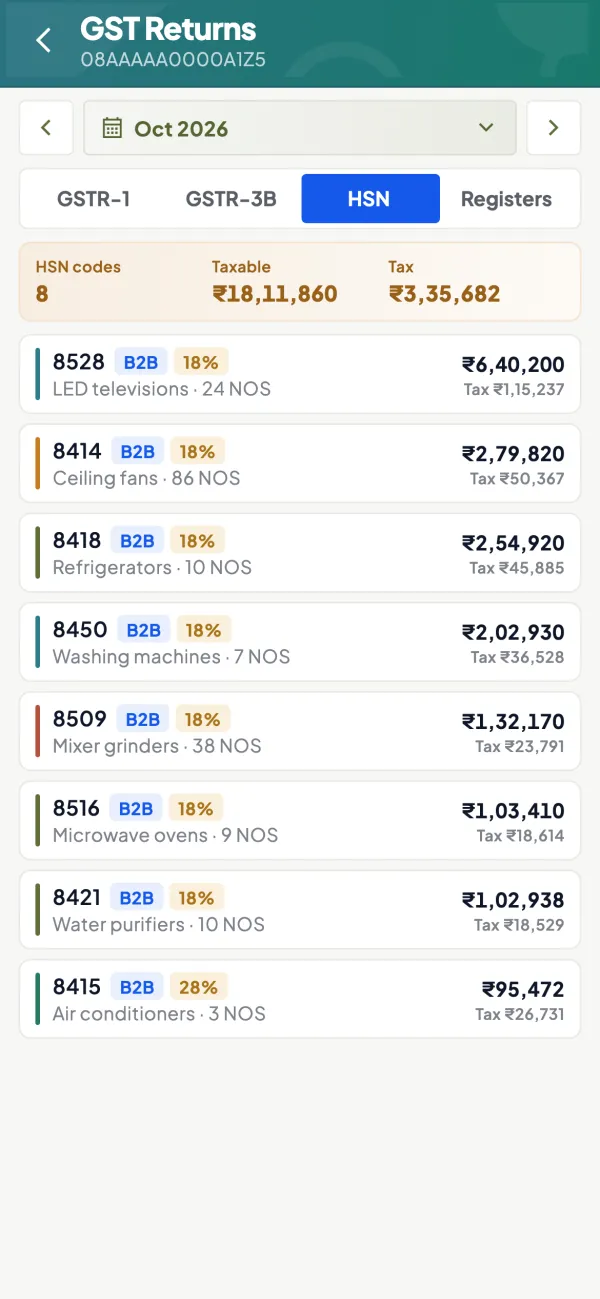
In TallyPrime, the taxability on each stock item (taxable, exempt, nil-rated, non-GST) decides where the sale is reported, so set it carefully in the item master. Cashflow OS reads those vouchers from Tally; its GSTR-1 view shows the month's totals, and the HSN-wise detail is a quick way to spot an item reported in the wrong category before the accountant prepares the return. Filing stays on the GST portal.
Avoid these
Common mistakes
- MistakeShowing zero-rated exports in the exempt rowDo this instead
Report exports and SEZ supplies in the zero-rated tables, so a refund-eligible supply is not hidden as exempt.
- MistakeClaiming full ITC on rent and power with exempt salesDo this instead
Split common ITC by the share of exempt turnover each month and true it up after the year closes.
- MistakeSetting an exempt item to 0% in the software, or the reverseDo this instead
Set the correct taxability on each item master so sales land in the right column of GSTR-1 and GSTR-3B.
- MistakeCharging GST on items whose rate has changedDo this instead
Review item rates and exemptions after every rate notification and check the current status on cbic-gst.gov.in.
Keep handy
Checklist
Nil-rated, exempt and non-GST supplies — 7 checks. Tick them as you go.
In Cashflow OS
How Cashflow OS helps
Cashflow OS puts your TallyPrime books on every phone in the team. Where it fits this topic:
GSTR-1 view from your Tally vouchers
Cashflow OS shows the month's GSTR-1 totals prepared from Tally, so you can check nil-rated and exempt totals before the accountant prepares the return.
See GST reports from your Tally data
HSN-wise detail to spot wrong categories
The HSN-wise view helps you find an item reported in the wrong category. Taxability is still set in the TallyPrime item master, and filing stays on the GST portal.
Questions people ask
Is nil-rated the same as exempt?
Are exports exempt from GST?
Which goods are non-GST?
Do I report nil-rated sales in GSTR-1?
What is a bill of supply?
Do I need to reverse ITC if exempt sales are small?
Where do I show purchases of petrol or diesel?
Can one bill have taxable and exempt items?
This page is general information for Indian businesses, not tax, legal or financial advice. Rules and rates change — check the official portals or your CA before acting.